Project Setup
Learning Objectives
In this lab, you'll:
- Initialize a new Cloudflare Worker project for the Intelligence Collector
- Configure KV storage for threat intelligence data
- Set up automated scheduling with cron triggers
- Understand the basic Worker architecture
Time Estimate
5 minutes
Step 1: Initialize the Worker Project
Create a new Cloudflare Worker project specifically for intelligence collection:
npm create cloudflare@latest intelligence-collector
cd intelligence-collector
When prompted:
- Choose Hello World Example
- Which template: Worker only
- Use TypeScript: Yes
- Use git: Yes (recommended)
- Deploy now: No (we'll deploy manually)
This creates a dedicated project with:
src/index.ts- Your main Worker codewrangler.jsonc- Worker configurationpackage.json- Dependencies and scriptstsconfig.json- TypeScript configuration
Step 2: Create KV Storage
Create a dedicated KV namespace for threat intelligence data:
npx wrangler kv namespace create "THREAT_INTEL"
Expected Output:
🌀 Creating namespace with title "intelligence-collector-THREAT_INTEL"
✨ Success!
Add the following to your configuration file:
kv_namespaces = [
	{ binding = "THREAT_INTEL", id = "abc123def456ghi789" }
]
Step 3: Configure Your Worker
Update your wrangler.jsonc with the KV namespace and scheduling:
{
  "name": "intelligence-collector",
  "main": "src/index.ts",
  "compatibility_date": "2025-08-19",
  "kv_namespaces": [
    {
      "binding": "THREAT_INTEL",
      "id": "YOUR_ACTUAL_ID_FROM_STEP_2"
    }
  ],
  "triggers": {
    "crons": ["*/15 * * * *"]
  },
  "observability": {
    "enabled": true,
    "head_sampling_rate": 1
  }
}
Important: Replace YOUR_ACTUAL_ID_FROM_STEP_2 with the actual ID from the command output.
Step 4: Understand the Worker Structure
Let's examine the basic Worker structure. Create src/types.ts and update src/index.ts:
export interface Env {
    THREAT_INTEL: KVNamespace;
}

export interface ThreatSource {
    name: string;
    url: string;
    weight: number;
    format: 'plain' | 'csv' | 'json';
    timeout: number;
    user_agent: string;
}

export interface ThreatIP {
    ip: string;
    score: number;
    sources: string[];
    first_seen: string;
    last_seen: string;
    is_whitelisted: boolean;
}

export interface CollectionResult {
    threats: Map<string, ThreatIP>;
    stats: {
        total_sources: number;
        successful_sources: string[];
        failed_sources: string[];
        total_raw_ips: number;
        unique_ips: number;
        processing_time_ms: number;
    };
}

export interface WhitelistEntry {
    ip: string;
    reason: string;
    added_by: string;
    added_at: string;
    type: 'cloudflare' | 'custom';
}

export interface WhitelistConfig {
    cloudflare: string[];
    custom: WhitelistEntry[];
    last_updated: string;
}

export interface EnhancedThreatIP extends ThreatIP {
    confidence_level: 'low' | 'medium' | 'high' | 'very_high';
    risk_category: 'spam' | 'malware' | 'botnet' | 'scanning' | 'unknown';
    geographic_info?: {
        country?: string;
        asn?: string;
        org?: string;
    };
    last_validation: string;
    expires_at: string;
}

export interface ThreatScoringConfig {
    confidence_thresholds: {
        low: number;
        medium: number;
        high: number;
        very_high: number;
    };
    max_age_hours: number;
    source_weights: Record<string, number>;
}


export interface ThreatIntelligenceStats {
    collection: {
        last_run: string;
        duration_ms: number;
        sources_attempted: number;
        sources_successful: number;
        sources_failed: string[];
    };
    processing: {
        raw_ips_collected: number;
        unique_ips_processed: number;
        duplicates_removed: number;
        validation_passed: number;
        validation_failed: number;
    };
    scoring: {
        confidence_distribution: Record<string, number>;
        risk_distribution: Record<string, number>;
        average_score: number;
        highest_score: number;
    };
    whitelist: {
        total_checked: number;
        cloudflare_protected: number;
        custom_protected: number;
        active_threats: number;
    };
    data_quality: {
        freshness_hours: number;
        expired_removed: number;
        stale_warnings: number;
        data_coverage_percentage: number;
    };
}

export interface APIResponse<T = any> {
    success: boolean;
    data?: T;
    error?: {
        code: string;
        message: string;
        details?: any;
    };
    metadata: {
        timestamp: string;
        request_id: string;
        processing_time_ms: number;
        version: string;
    };
}

export interface PaginatedResponse<T> extends APIResponse<T[]> {
    pagination: {
        page: number;
        limit: number;
        total: number;
        has_next: boolean;
        has_previous: boolean;
    };
}

export interface ThreatIPResponse {
    ip: string;
    score: number;
    confidence_level: string;
    risk_category: string;
    sources: string[];
    first_seen: string;
    last_seen: string;
    is_whitelisted: boolean;
    geographic_info?: {
        country?: string;
        asn?: string;
        org?: string;
    };
}

export interface IPCheckResponse {
    ip: string;
    status: 'threat' | 'whitelisted' | 'clean' | 'unknown';
    threat_info?: ThreatIPResponse;
    whitelist_info?: {
        type: 'cloudflare' | 'custom';
        reason: string;
        added_at: string;
    };
    recommendations: string[];
}
// Main Worker export with two key functions
export default {
    // Handles HTTP requests (API endpoints)
    async fetch(request: Request, env: Env, ctx: ExecutionContext): Promise<Response> {
        return new Response('Intelligence Collector API - Coming Soon!', {
            headers: { 'Content-Type': 'text/plain' }
        });
    },

    // Handles scheduled execution (automated data collection)
    async scheduled(event: ScheduledEvent, env: Env, ctx: ExecutionContext): Promise<void> {
        console.log('Scheduled collection triggered at:', new Date().toISOString());
        // Data collection logic will go here
    },
};
Step 5: Util functions
export function isValidIP(ip: string): boolean {
    const ipv4Regex = /^(?:(?:25[0-5]|2[0-4][0-9]|[01]?[0-9][0-9]?)\.){3}(?:25[0-5]|2[0-4][0-9]|[01]?[0-9][0-9]?)$/;
    return ipv4Regex.test(ip);
}

export function ipToInt(ip: string): number {
    const parts = ip.split('.').map(Number);
    return (parts[0] << 24) + (parts[1] << 16) + (parts[2] << 8) + parts[3];
}

export function isIpInCidr(ip: string, cidr: string): boolean {
    try {
        const [rangeIp, prefixLengthStr] = cidr.split('/');
        const prefixLength = parseInt(prefixLengthStr, 10);

        if (!isValidIP(ip) || !isValidIP(rangeIp) || isNaN(prefixLength)) {
            return false;
        }

        if (prefixLength < 0 || prefixLength > 32) {
            return false;
        }

        const mask = ~(Math.pow(2, 32 - prefixLength) - 1);

        const ipInt = ipToInt(ip);
        const rangeInt = ipToInt(rangeIp);

        return (ipInt & mask) === (rangeInt & mask);
    } catch (error) {
        console.warn(`CIDR check failed for ${ip} in ${cidr}:`, error);
        return false;
    }
}

export function isIpInRanges(ip: string, ranges: string[]): boolean {
    for (const range of ranges) {
        if (isIpInCidr(ip, range)) {
            return true;
        }
    }
    return false;
}

export function isValidCidr(cidr: string): boolean {
    try {
        const [ip, prefixStr] = cidr.split('/');
        const prefix = parseInt(prefixStr, 10);

        return isValidIP(ip) && prefix >= 0 && prefix <= 32;
    } catch {
        return false;
    }
}
import { APIResponse, PaginatedResponse } from "../types";

export function generateRequestId(): string {
    return `req_${Date.now()}_${Math.random().toString(36).substr(2, 9)}`;
}

export function createAPIResponse<T>(
    data: T | null,
    error: { code: string; message: string; details?: any } | null,
    startTime: number,
    requestId: string
): APIResponse<T> {
    return {
        success: error === null,
        data: data || undefined,
        error: error || undefined,
        metadata: {
            timestamp: new Date().toISOString(),
            request_id: requestId,
            processing_time_ms: Date.now() - startTime,
            version: '1.0.0'
        }
    };
}

export function createPaginatedResponse<T>(
    items: T[],
    page: number,
    limit: number,
    total: number,
    startTime: number,
    requestId: string
): PaginatedResponse<T> {
    const totalPages = Math.ceil(total / limit);

    return {
        success: true,
        data: items,
        pagination: {
            page,
            limit,
            total,
            has_next: page < totalPages,
            has_previous: page > 1
        },
        metadata: {
            timestamp: new Date().toISOString(),
            request_id: requestId,
            processing_time_ms: Date.now() - startTime,
            version: '1.0.0'
        }
    };
}

export function parseQueryParams(url: URL): {
    page: number;
    limit: number;
    confidence?: string;
    category?: string;
    sort?: string;
    include_whitelisted?: boolean;
} {
    const page = Math.max(1, parseInt(url.searchParams.get('page') || '1'));
    const limit = Math.min(1000, Math.max(1, parseInt(url.searchParams.get('limit') || '100')));
    const confidence = url.searchParams.get('confidence') || undefined;
    const category = url.searchParams.get('category') || undefined;
    const sort = url.searchParams.get('sort') || 'score_desc';
    const include_whitelisted = url.searchParams.get('include_whitelisted') === 'true';

    return { page, limit, confidence, category, sort, include_whitelisted };
}
Step 5: Generate Cloudflare Types
Generate TypeScript types for Cloudflare Workers to enable better IDE support:
npx wrangler types
# or
npm run cf-typegen
This creates worker-configuration.d.ts with type definitions for your Worker environment, including KV bindings and other Cloudflare-specific types.
Step 6: Deploy and Test Your Setup
Deploy and test your initial Worker:
# Deploy to Cloudflare
npx wrangler deploy

# Test the basic endpoint
curl "https://intelligence-collector.YOUR-SUBDOMAIN.workers.dev"
Expected Response:
Intelligence Collector API - Coming Soon!
Step 7: Verify Scheduled Function Setup
Test that your scheduled function can be triggered:
npm run dev

# In another terminal, manually trigger the scheduled function
curl "http://localhost:8787/cdn-cgi/handler/scheduled?cron=*+*+*+*+*"
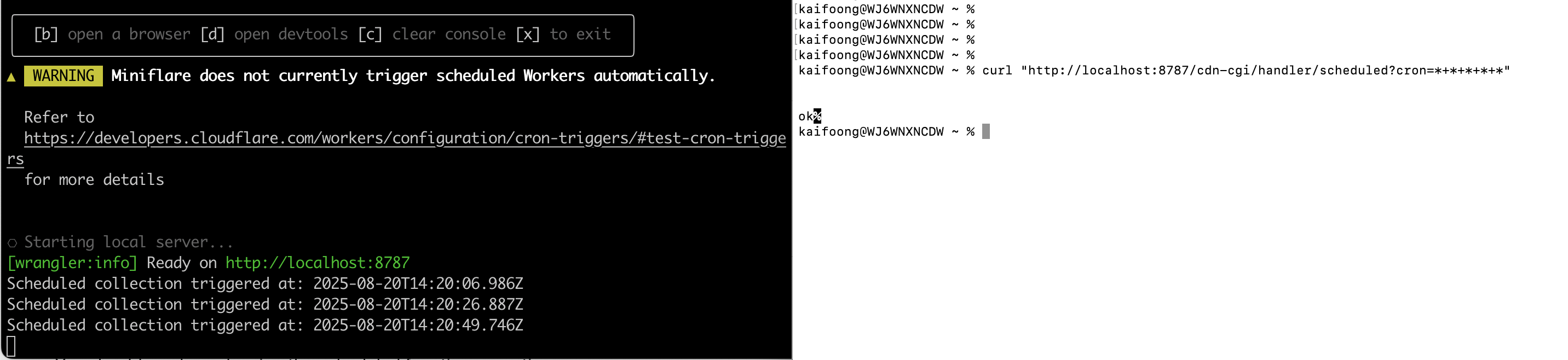
You should see logs showing the scheduled function execution.
Architecture Understanding
Key Components
- Fetch Handler - Processes HTTP requests, serves API endpoints
- Scheduled Handler - Runs automatically based on cron expressions
- KV Storage - Global, low-latency data persistence
- Environment Interface - Type-safe access to Worker resources
Data Flow
Cron Trigger → Scheduled Function → Threat Collection → KV Storage
                                                            ↓
HTTP Request → Fetch Handler → Read from KV → API Response
Worker Execution Model
- Isolates: Each request runs in an isolated V8 runtime
- Edge Locations: Code runs in 300+ global locations
- Zero Cold Start: Instant execution, no server spin-up time
- Automatic Scaling: Handles millions of requests automatically
Configuration Explained
Cron Expression Breakdown
"crons": ["*/15 * * * *"]
Format: minute hour day month day-of-week
*/15- Every 15 minutes*- Every hour*- Every day*- Every month*- Every day of week
Common Patterns:
*/15 * * * *- Every 15 minutes (recommended for threat feeds)0 */2 * * *- Every 2 hours0 0 * * *- Daily at midnight UTC0 0 * * 1- Weekly on Monday
KV Namespace Benefits
- Global Replication - Data available in all edge locations
- Low Latency - Sub-millisecond read times
- High Availability - 99.9% uptime SLA
- Automatic Expiration - TTL support for data lifecycle management
Troubleshooting
Common Issues
1. KV Namespace Not Found
Error: KV namespace with binding "THREAT_INTEL" not found
Solution: Verify the KV namespace ID in wrangler.jsonc matches the output from step 2.
2. Cron Syntax Error
Error: Invalid cron expression
Solution: Verify the cron expression uses the correct format with 5 fields.
3. Deployment Permission Error
Error: You do not have permission to deploy
Solution: Run wrangler auth login to authenticate with Cloudflare.
Validation Commands
# Check Worker status
npx wrangler status

# List KV namespaces
npx wrangler kv namespace list

# View live logs
npx wrangler tail --format=pretty
Next Steps
Your Intelligence Collector foundation is now set up! You have:
- ✅ A deployed Worker with proper TypeScript configuration
- ✅ KV storage ready for threat intelligence data
- ✅ Automated scheduling configured for data collection
- ✅ Basic project structure understanding
In the next lab, you'll implement Multi-Source Threat Intelligence Feeds to start collecting real threat data from multiple sources.
Key Takeaways
- Separation of Concerns - HTTP handling vs. scheduled tasks
- Global Edge Deployment - Your code runs worldwide automatically
- Resource Bindings - Type-safe access to Cloudflare services
- Configuration as Code - Infrastructure defined in
wrangler.jsonc